Objects in JavaScript are used to store keyed collection of various data and more complex entities.
An object can be created with {..} with an optional list of properties. A property is a “key: value” pair, where key is a string(also called as property name) and value can be anything.
An empty object can be created using one of the two methods
let user=new Object();   //object constructor syntax
let user={};            // object literal syntax
We can immediately put some properties into {...} as “key: value” pairs:
let user={
 name:"vinod",
 age:30
};
A property has a key (also known as “name” or “identifier”) before the colon ":" and a value to the right of it.
In the user object, there are two properties:
The first property has the name "name" and the value "vinod".
The second one has the name "age" and the value 30.
Property values are accessible using the dot notation:
// get property values of the object:
alert( user.name ); // vinod
alert( user.age ); // 30
The value can be of any type. Let’s add a boolean one:
user.isAdmin = true;
To remove a property, we can use the delete operator:
delete user.age;
We can also use multiword property names, but then they must be quoted:
let user = {
  name: "vinod",
  age: 30,
  "likes birds": true  // multiword property name must be quoted
};
For multiword properties, the dot access doesn’t work:
// this would give a syntax error
user.likes birds = true
JavaScript doesn’t understand that. It thinks that we address user.likes, and then gives a syntax error when comes across unexpected birds.
The dot requires the key to be a valid variable identifier. That implies: contains no spaces, doesn’t start with a digit and doesn’t include special characters ($ and _ are allowed).
There’s an alternative “square bracket notation” that works with any string:
let user = {};

// set
user["likes birds"] = true;

// get
alert(user["likes birds"]); // true

// delete
delete user["likes birds"];
It supports connection reuse i.e. for every TCP connection there could be multiple requests and responses, and pipelining where the client can request several resources from the server at once. However, pipelining was hard to implement due to issues such as head-of-line blocking and was not a feasible solution.
Uses multiplexing, where over a single TCP connection resources to be delivered are interleaved and arrive at the client almost at the same time. It is done using streams which can be prioritized, can have dependencies and individual flow control. It also provides a feature called server push that allows the server to send data that the client will need but has not yet requested.
Status Code
Introduces a warning header field to carry additional information about the status of a message. Can define 24 status codes, error reporting is quicker and more efficient.
Underlying semantics of HTTP such as headers, status codes remains the same.
Authentication Mechanism
It is relatively secure since it uses digest authentication, NTLM authentication.
Security concerns from previous versions will continue to be seen in HTTP/2. However, it is better equipped to deal with them due to new TLS features like connection error of type Inadequate_Security.
Caching
Expands on the caching support by using additional headers like cache-control, conditional headers like If-Match and by using entity tags.
HTTP/2 does not change much in terms of caching. With the server push feature if the client finds the resources are already present in the cache, it can cancel the pushed stream.
Web Traffic
HTTP/1.1 provides faster delivery of web pages and reduces web traffic as compared to HTTP/1.0. However, TCP starts slowly and with domain sharding (resources can be downloaded simultaneously by using multiple domains), connection reuse and pipelining, there is an increased risk of network congestion.
HTTP/2 utilizes multiplexing and server push to effectively reduce the page load time by a greater margin along with being less sensitive to network delays.
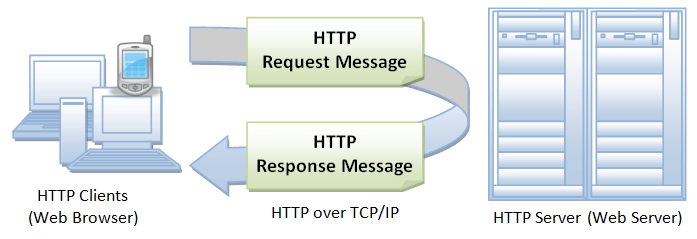
The Hyper Text Transfer Protocol (HTTP) is an application layer protocol designed to transfer information between network devices and runs on the top of other layers of the network protocol stack. HTTP is the foundation of web, and used to load webpages using hypertext links.
Typical Flow of HTTP
A typical flow over HTTP involves a client machine making a request to a server, which then sends a response message. HTTP is a stateless protocol i.e., the current request doesn’t know what has been done in the previous request.
What happens when you enter a URL in a Browser?
The following steps takes place when you enter an URL address in the browser address bar.
The browser translates the URL into a request message according to the specified protocol and sends the request to the server. For example, when you type https://www.someurl.com/index.html in the address bar, the browser translates it into following code
When this request reaches the server, the server can either take either one of these actions:
The server interprets the request received, maps the request into a file under the server’s document directory, and returns the file requested to the client
The server interprets the request received, maps the request into a program kept in the server, executes the program, and returns the output of the program to the client.
The request cannot be satisfied, the server returns an error message. An example of the HTTP response code shown below
HTTP/1.1 200 OK
Date: Sun, 18 Oct 2009 08:56:53 GMT
Server: Apache/2.2.14 (Win32)
Last-Modified: Sat, 20 Nov 2004 07:16:26 GMT
ETag: "10000000565a5-2c-3e94b66c2e680"
Accept-Ranges: bytes
Content-Length: 44
Connection: close
Content-Type: text/html
What’s an HTTP method?
An HTTP method, sometimes referred to as an HTTP verb, indicates the action that the HTTP request expects from the queried server. For example, two of the most common HTTP methods are ‘GET’ and ‘POST’; a ‘GET’ request expects information back in return (usually in the form of a website), while a ‘POST’ request typically indicates that the client is submitting information to the web server (such as form information, e.g. a submitted username and password).
What are HTTP request headers?
HTTP headers contain text information stored in key-value pairs, and they are included in every HTTP request (and response, more on that later). These headers communicate core information, such as what browser the client is using what data is being requested.
Example of HTTP request headers from Google Chrome’s network tab:
What’s in an HTTP request body?
The body of a request is the part that contains the ‘body’ of information the request is transferring. The body of an HTTP request contains any information being submitted to the web server, such as a username and password, or any other data entered into a form.
What’s in an HTTP response?
An HTTP response is what web clients (often browsers) receive from an Internet server in answer to an HTTP request. These responses communicate valuable information based on what was asked for in the HTTP request.
A typical HTTP response contains:
An HTTP status code
HTTP response headers
optional HTTP body
HTTP Status Code
HTTP status codes are 3-digit codes most often used to indicate whether an HTTP request has been successfully completed. Status codes are broken into the following 5 blocks:
1xx Informational
2xx Success
3xx Redirection
4xx Client Error
5xx Server Error
The “xx” refers to different numbers between 00 and 99.
Status codes starting with the number ‘2’ indicate a success. For example, after a client requests a web page, the most commonly seen responses have a status code of ‘200 OK’, indicating that the request was properly completed.
If the response starts with a ‘4’ or a ‘5’ that means there was an error and the webpage will not be displayed. A status code that begins with a ‘4’ indicates a client-side error (It’s very common to encounter a ‘404 NOT FOUND’ status code when making a typo in a URL). A status code beginning in ‘5’ means something went wrong on the server side. Status codes can also begin with a ‘1’ or a ‘3’, which indicate an informational response and a redirect, respectively.
HTTP Response Headers
Much like an HTTP request, an HTTP response comes with headers that convey important information such as the language and format of the data being sent in the response body.
Example of HTTP response headers from Google Chrome’s network tab:
HTTP response body
Successful HTTP responses to ‘GET’ requests generally have a body which contains the requested information. In most web requests, this is HTML data which a web browser will translate into a web page.


 Developers Blog