What is HTTP?
The Hyper Text Transfer Protocol (HTTP) is an application layer protocol designed to transfer information between network devices and runs on the top of other layers of the network protocol stack. HTTP is the foundation of web, and used to load webpages using hypertext links.
Typical Flow of HTTP
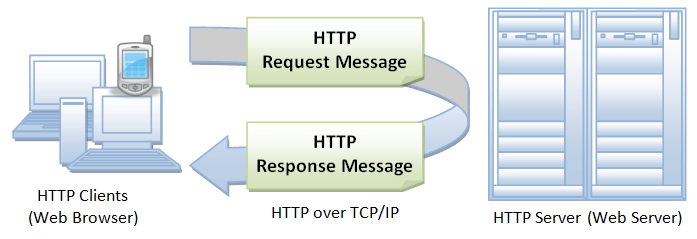
A typical flow over HTTP involves a client machine making a request to a server, which then sends a response message. HTTP is a stateless protocol i.e., the current request doesn’t know what has been done in the previous request.
What happens when you enter a URL in a Browser?
The following steps takes place when you enter an URL address in the browser address bar.
- The browser translates the URL into a request message according to the specified protocol and sends the request to the server. For example, when you type https://www.someurl.com/index.html in the address bar, the browser translates it into following code
GET /index.html HTTP/1.1
Host: www.someurl.com
Accept: image/gif, image/jpeg, */*
Accept-Language: en-us
user-agent: Mozilla/4.0 - When this request reaches the server, the server can either take either one of these actions:
- The server interprets the request received, maps the request into a file under the server’s document directory, and returns the file requested to the client
- The server interprets the request received, maps the request into a program kept in the server, executes the program, and returns the output of the program to the client.
- The request cannot be satisfied, the server returns an error message. An example of the HTTP response code shown below
HTTP/1.1 200 OK
Date: Sun, 18 Oct 2009 08:56:53 GMT
Server: Apache/2.2.14 (Win32)
Last-Modified: Sat, 20 Nov 2004 07:16:26 GMT
ETag: "10000000565a5-2c-3e94b66c2e680"
Accept-Ranges: bytes
Content-Length: 44
Connection: close
Content-Type: text/html
What’s an HTTP method?
An HTTP method, sometimes referred to as an HTTP verb, indicates the action that the HTTP request expects from the queried server. For example, two of the most common HTTP methods are ‘GET’ and ‘POST’; a ‘GET’ request expects information back in return (usually in the form of a website), while a ‘POST’ request typically indicates that the client is submitting information to the web server (such as form information, e.g. a submitted username and password).
What are HTTP request headers?
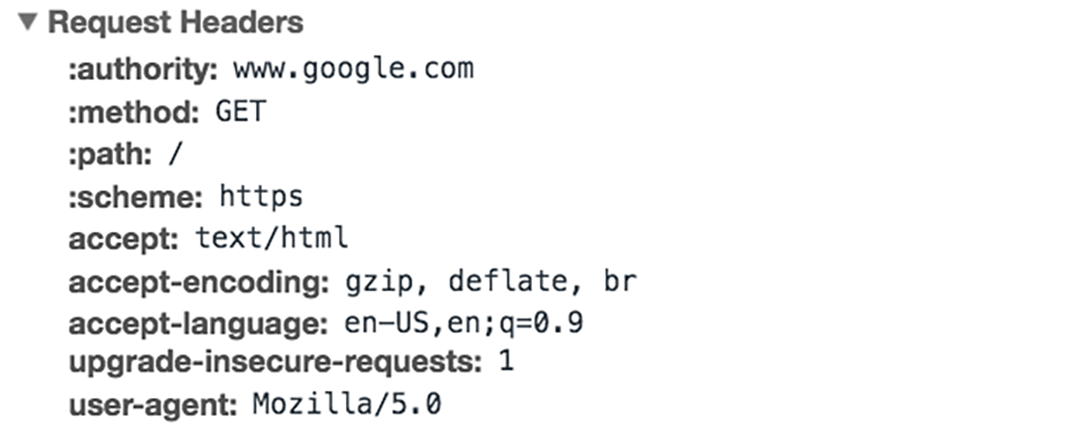
HTTP headers contain text information stored in key-value pairs, and they are included in every HTTP request (and response, more on that later). These headers communicate core information, such as what browser the client is using what data is being requested.
Example of HTTP request headers from Google Chrome’s network tab:
What’s in an HTTP request body?
The body of a request is the part that contains the ‘body’ of information the request is transferring. The body of an HTTP request contains any information being submitted to the web server, such as a username and password, or any other data entered into a form.
What’s in an HTTP response?
An HTTP response is what web clients (often browsers) receive from an Internet server in answer to an HTTP request. These responses communicate valuable information based on what was asked for in the HTTP request.
A typical HTTP response contains:
- An HTTP status code
- HTTP response headers
- optional HTTP body
HTTP Status Code
HTTP status codes are 3-digit codes most often used to indicate whether an HTTP request has been successfully completed. Status codes are broken into the following 5 blocks:
- 1xx Informational
- 2xx Success
- 3xx Redirection
- 4xx Client Error
- 5xx Server Error
The “xx” refers to different numbers between 00 and 99.
Status codes starting with the number ‘2’ indicate a success. For example, after a client requests a web page, the most commonly seen responses have a status code of ‘200 OK’, indicating that the request was properly completed.
If the response starts with a ‘4’ or a ‘5’ that means there was an error and the webpage will not be displayed. A status code that begins with a ‘4’ indicates a client-side error (It’s very common to encounter a ‘404 NOT FOUND’ status code when making a typo in a URL). A status code beginning in ‘5’ means something went wrong on the server side. Status codes can also begin with a ‘1’ or a ‘3’, which indicate an informational response and a redirect, respectively.
HTTP Response Headers
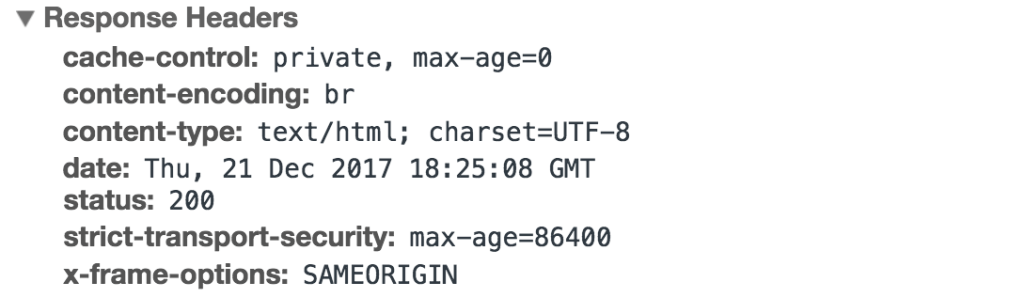
Much like an HTTP request, an HTTP response comes with headers that convey important information such as the language and format of the data being sent in the response body.
Example of HTTP response headers from Google Chrome’s network tab:
HTTP response body
Successful HTTP responses to ‘GET’ requests generally have a body which contains the requested information. In most web requests, this is HTML data which a web browser will translate into a web page.

 Developers Blog
1 Comment